Configurable Input

Description

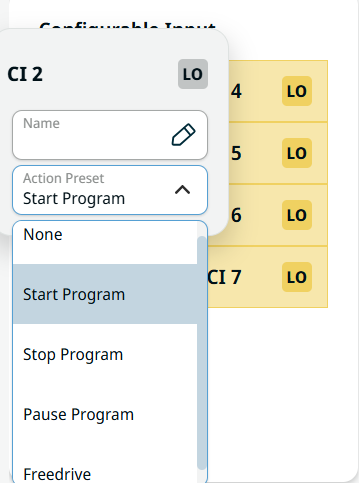
Configurable input can be reserved for special safety settings defined in the IO Setup under Safety IO. Under those which are reserved for safety settings (CI 0 and CI 1), named Safeguard Reset, are in gray and cannot be edited. CI 2–CI 7 have editable fields.


To access Configurable Input
  1. Tap CI 2, and the Name and Action Preset fields appear. In the Name field, create a name and Confirm. The new name can now be seen in the communication screen.

 
  1. Tap the Action Preset field, and five choices are available:

    • None

    • Start Program. Starts the loaded program.

    • Stop Program. Stops the loaded program.

    • Pause Program. Pauses the loaded program.

    • Freedrive. Sets the robot in freedrive mode, just like the button on the back of the teach pendant.

  2. Choose the pertinent action preset.

  3. Repeat the steps above for CI 3 to CI 7.